uAttend BN6500 WiFi Biometric Web-Hosted Time Clock
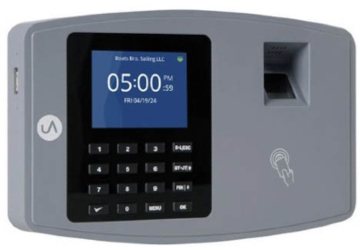
Buy The uAttend BN6500 Biometric Cloud Time Clock
Description
The uAttend BN6500 time clock is a cloud-based biometric time clock designed for businesses that want accurate employee time tracking without maintaining local software. Employees clock in using fingerprint verification, RFID badges, or PIN entry while punch data is automatically updated in the uAttend cloud system. Businesses choose the BN6500 to reduce payroll errors, improve accountability, and simplify daily attendance tracking.
The clock connects using WiFi or LAN and synchronizes punch data in real time for reporting and payroll processing. Offline mode allows punches to continue during temporary internet interruptions, with stored data syncing automatically once connectivity returns. This helps maintain complete time records without manual correction or data loss.
Compared with traditional standalone punch clocks, cloud systems reduce maintenance requirements and make it easier to expand as employee counts or locations grow. Administrators can access timecards remotely while maintaining consistent attendance policies across departments. Biometric identification helps prevent buddy punching and improves overall timekeeping accuracy.
The BN6500 is commonly selected by businesses upgrading from paper time cards or older electronic clocks that want a reliable biometric solution with centralized management and scalable cloud operation.
Compatibility / Usage / Key Features
- Biometric fingerprint employee identification
- RFID badge and PIN punching options
- Cloud-hosted attendance and reporting
- WiFi or LAN connectivity
- Offline punch storage and automatic sync
- Touchscreen interface
- Remote access to timecards and reports
Related Items
uAttend JR2000 Touch Tablet Time Clock
uAttend DR2000 Facial Recognition Time Clock
uAttend RFID Cards and Key Fobs
uAttend Cloud Subscription Plans
FAQ
Is a subscription required?
Yes. The BN6500 operates using uAttend cloud software with an active plan.
Can the system grow with my business?
Yes. Additional employees and clocks can be added without replacing hardware.
Does fingerprint punching prevent buddy punching?
Yes. Biometric verification helps ensure employees clock in for themselves.
Can timecards be accessed remotely?
Yes. Managers can access attendance data from any internet-connected device.
All uAttend web-hosted webtimeclock systems include:
- Unlimited departments - Separate and segment employees any way you like!
- Revision Zones - A Very Powerful Financial Tool:
Also known as In-Punch and Out-Punch Rounding Zones, by Department
- Lock Out Zones - Block (automatically refuse) IN punches that are too early!
- Punch Change Accountability - know who made the change-
- Tells you who made the change, when, and from what I.P. address.
- Overtime - Weekly, Daily, and 7th day consecutive overtime
- Who's-IN board - See your work force status in Real Time
- Punch Notifications - Get emails any time any employee punches
- Geo-Fencing - Available when using the (free) mobile app.
Alerts you when employee is punching when NOT ON LOCATION.
- Punch rounding - Select from several options- 15 minute rounding, etc.
- Automatic Lunch Deductions - Customizable for your requirements
- Time Card Approvals - 3 levels of authority to use at your discretion
- Email Time Cards to Employees - Daily, weekly, or once per pay period
- Multiple Time Zones - set regional time zone to employee
- Automatic Break Additions - Stay in compliance with all paid break regulations
- Paid Holidays - Track holidays as paid and set pay codes based on working
- Multiple Pay Periods - Weekly, bi-weekly, semi-monthly, monthly
- View & Print Time Cards in Batches - individually or in batches
- Summary Reports - Data ready to be used for payroll
- Reports - Run time reports by employee, department, or system wide
- Exports - .csv is included. Dozens of payroll reports are available, including ADP, Paychex, and QuickBooks - $5 per month additional fee.
- Self Service online help - find the the information you need, when you want it
- Toll-Free Technical Support, 8 - 5, Monday - Friday, PST
- Scheduling - Set up schedules (start and end-times) for departments or individuals.
- Shift Differentials - Administrators can add work shifts and pay rates to their departments and employees. Great for nursing homes.
- Shift Alarms - Supervisors will get e-mail alerts for early or late employee punch times.
- Variable pay rates by employee - pay them different rates for different departments.
- Shift Report - Allows you to view the hours worked for a shift. The data can be listed by employee or shift code and is filtered by date or shift code
- Job costing
- Accruals - Track accrued Vacation, Sick, and other hours per hour worked.