|
|
 |

uAttend MN2000 Facial Recognition Time Clock
Description
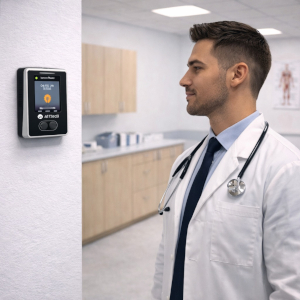
uAttend MN2000 is a facial recognition time clock designed for use with the uAttend cloud portal subscription. It is used to record employee punches by face scan, with RFID badge/key fob and PIN punch options as backups. Businesses choose this system to cut down on buddy punching, reduce manual time edits, and keep payroll moving with online approvals and exportable reports.
FTC is service-oriented: we focus on helping you transition smoothly from paper time cards or older keypad clocks into a cloud system that managers can access from anywhere. The MN2000 sends punch data to the cloud in real time, so supervisors can catch missed punches, early starts, and exception patterns before the end of the pay period. That typically means fewer corrections on payroll day and cleaner records for wage-and-hour questions.
This model connects via wired Ethernet (LAN) by plugging directly into your router or network switch. uAttend states the monthly subscription is required and includes software upgrades, data storage, and customer support. The portal also supports rules and policies set online and synced to the clock, plus department transfers at the terminal for basic labor allocation.
For multi-location or growing teams, you can add additional uAttend clocks under the same company account so reporting stays centralized. A simple rollout approach is to enroll employees in small groups, post a quick punch procedure sign near the clock, and assign a manager to review exceptions daily for the first two pay periods.
Compatibility / Usage / Key Features
- Wired LAN connection for dependable, always-on cloud posting
- Facial recognition for fast identity verification at the clock
- Backup methods: RFID and PIN for flexibility during enrollment
- Cloud timecards, exceptions, approvals, and reporting dashboard
- Department transfers at the clock for job/department tracking
- Payroll exports to most payroll systems
Support note: setup, software updates, and ongoing technical support are provided by the manufacturer’s U.S.-based support team.
Related Items
- uAttend Cloud Subscription (monthly)
- uAttend RFID Cards / Key Fobs
- Business Router or Network Switch
- Spare Ethernet Cable (CAT6)
FAQ
Q: Will the MN2000 work if my WiFi is weak?
A: Yes. It uses wired Ethernet (LAN), which avoids WiFi coverage problems.
Q: Do employees have to use facial recognition?
A: No. RFID and PIN are available as backup punch options.
Q: Can managers review punches from home or a second office?
A: Yes. The cloud portal is accessible from any internet-connected device.
Q: What is included with the subscription?
A: uAttend includes portal access plus upgrades, storage, and U.S.-based support.
Browse more: uAttend solutions | Time clocks | Time & attendance
uAttend month-to-month hosting fees
- Access the records from anywhere, password protected.
- No contract, this is month-to month, changes with your employee levels
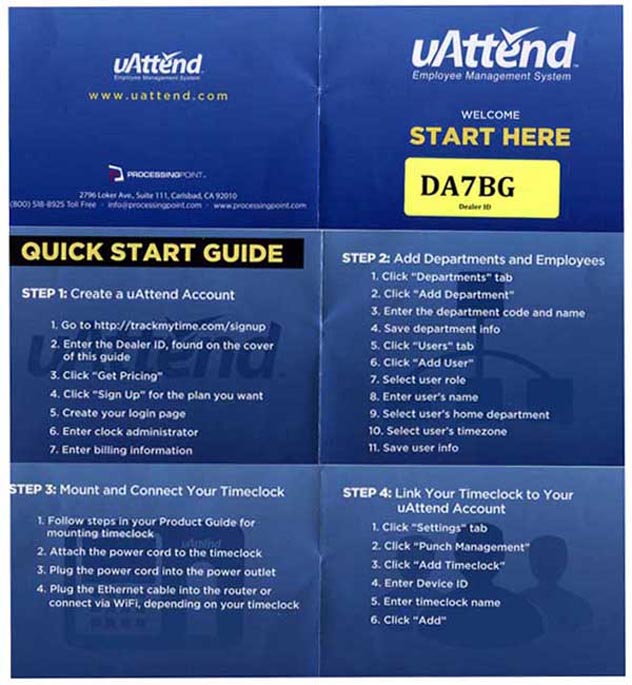
 Activation: Click on this image to begin the signup process:
Enter this Dealer ID number: DA7BG
uAttend software features:
- Export files are available for virtually all payroll and accounting software packages, including:
- ADP, CSV, Excel, MAS90, Paychex, QuickBooks, and more.
- See who is punching in by department, and by clock
- Instantly updates the records the moment they punch in or out
- Many handy detailed and summary reports
- Computes standard time and overtime, including multi-level
(8 and 10 hrs, 40 and 48 hrs, etc), 40 or 44 in a week, etc. and 7th day OT
- Sends alerts to individual employees or to entire departments
- Easily control multiple offices in real-time, from any PC connected to the internet
- Easily upload your own company logo to the clock display
- Managers get their own unique password, and assigned program privileges
- Activation: Click on this image to begin the signup process:
Enter this Dealer ID number: DA7BG
All uAttend systems include:
- Unlimited Departments - Separate and segment employees any way you like!
- Overtime - Weekly, Daily, and 7th day consecutive overtime
- Revision Zones - Also known as In-Punch and Out-Punch "Rounding" Zones
- Lock Out Zones - Blocks unauthorized IN punches
- Who's-IN board See your work force status in Real Time
- Punch Notifications - Get emails any time any employee punches
- Accruals - Track vacation, sick, and one other accrual
- Scheduling - set individual, departmental, and rotating schedules
- Punch rounding - Select from several options - pay to minute, or rounding
- Automatic Lunch Deductions - Customizable for your requirements
- Time Card Approvals - 3 levels of authority to use at your discretion
- Email Time Cards to Employees - Daily, weekly, or once per pay period
- Email employee alerts to managers - This Is Amazing:
Schedule violations, when someone punches in or out, approaching overtime
- Multiple Time Zones - set regional time zone to employee
- Automatic Break Additions - Stay in compliance with all paid break regulations
- Holidays - Track holidays as paid and set pay codes based on working
- Supports All Pay Periods: Weekly, bi-weekly, semi-monthly, monthly
- View & Print Time Cards in Batches - individually or in batches
- Summary Reports - Print at your desk, send off to payroll
- Reports - Run time reports by employee, department, or system wide
- Exports - Dozens of payroll reports are available, including ADP, Paychex, and QuickBooks
- Self Service online help - find the the information you need, when you want it
- Direct technical support, 24/7/365
- Much, much more! Since uAttend is an hosted product, when features and upgrades are released, they are automatically added to the your system
SmartPhone App This is a free app-
it can be used in conjunction with a clock, or just by itself
Punch IN/OUT from your phone, and/or from a PC - work remotely
The mobile application is one of the many methods that employees can use to clock in and out of the system. The updated uAttend mobile app is currently available for Android users. uAttend's iPhone and iPad app will also soon be updated. It can also work with the GPS feature on a smart phone, and show you where the employee is, when signing in, and out.
New features make this application a convenient tool for administrators and supervisors to manage the system on their handheld device, without needing access to a computer. They can now edit time cards, approve time cards, and run department summaries for payroll using the mobile app.
Supervisors can punch in an entire group of employees, all at once, on their tablet or smart-phone.
Administrators and supervisors can also view the Who’s In Board, which provides convenient employee tracking by showing the current status (IN or OUT) of each employee, by department.
Supervisors can also now perform a “group punch” so that they can punch in multiple employees in their department at one time. This saves employees time and eliminates the need for each employee to access the system individually.
Employees can view their timecards when they punch in and out and may also be able to approve their timecards.
In addition to the improved mobile app, the new release of uAttend also features a Dashboard homepage that allows administrators to view productivity charts, a Punch Management screen that contains information for all methods of employee punching, and much more.
MN2000 physical specifications:
The uAttend MN2000 is 4.35" wide, 6.25" Tall (H) and about 2 lbs mounted to your wall.
It is powered by a standard 110V to 12VDC power supply
Connects by Ethernet cable to your network.
The software is in the cloud, you can never lose your data.
Punches and reports are updated instantly.
In the event of a internet interruption, the clock will continue to work when the internet connection is interrupted, storing punches. At that time, it will upload the saved punches.
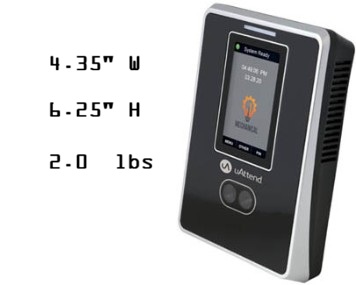
Why do we post this? Because our images are home-made, they are not exactly true to size.
Close, but not exact.
With built-in offline storage, the MN2000 continues capturing employee punches during internet disruptions. Stored data syncs automatically once the connection resumes, ensuring time records remain complete and accurate without manual intervention.